Every aspect of business has productivity components that can be measured and quantified in some way. The more productive and cost-effective your organization is, the better it will perform financially.
Unproductive, poorly-performing organizations lag behind their competitors and, in the worst-case scenario, can cease to exist altogether.
Internal communication is an essential aspect of any well-run business. It’s important that employees are kept in the loop and understand the company’s key objectives and are told the relevant information in a timely manner so that they can do their jobs properly.
The scale of the communication problem is significant:
Grammarly and The Harris Poll's State of Business Communication research estimates that ineffective communication costs US businesses up to $1.2 trillion annually, or approximately $12,506 per employee per year.
But, unfortunately, the internal communication system in many organizations is just not up to scratch. In some businesses, there is little or poor internal communication. While in others, there are systems in place, but they’re just not performing very well… and can be contributing to productivity inefficiencies in many different ways.
1. Email overload: what is it and what is it costing your company?
Email is a tool that many businesses rely on for internal communications, first and foremost, to relay important information to employees. Unfortunately, in the modern office, it has become a point of frustration for many workers who feel as though they are bombarded with constant information that they simply can’t keep up with.
According to The Radicati Group's 2024–2028 Email Statistics Report, total worldwide email traffic reached approximately 376 billion messages sent and received per day in 2025, and is projected to exceed 424 billion daily by 2028. The number of email users worldwide has surpassed 4.6 billion.
There have been numerous studies in recent years about productivity inefficiencies caused by email.
It’s estimated that the average office worker receives at least 121 new emails every single day. Many of these go unopened and unread and can become lost and buried in inboxes as the employee simply may not have time to open and react to or respond to every new item that arrives in the inbox.
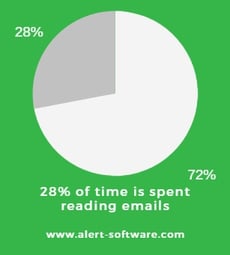
Research consistently finds that office workers spend approximately 28% of their workweek reading and responding to emails — roughly 11 hours per week.
McKinsey Global Institute first documented this in 2012, and Microsoft's 2025 Work Trend Index confirms the figure remains consistent, with the average knowledge worker receiving 117 emails per day and being interrupted approximately every two minutes by messages and notifications.
Many of the emails sent are corporate spam or marketing materials. Other times, they might be sent to the entire organization, such as an outage notification for a particular software program that should have only been directed to a specific group of employees.
Many workers CC or BCC multiple people who don’t need to be included in the email in the first place. Other times, someone will respond to everyone CC’d in on an email with a short, irrelevant answer like “thanks!”. These all add up, every single day.
The constant interruption of new emails arriving is distracting for many workers and can cause them to lose focus on the task they were initially performing when the new email arrived.
Gallup research found that email was one of the biggest sources of workplace disruption that leaves workers feeling as though they aren’t getting through the tasks on their “to-do” lists as quickly as they would like each day.
The research suggests that it can take a worker as long as 23 minutes and 15 seconds to completely refocus on the original task when they’ve been interrupted… one of the perils of our multi-tasking modern work culture.
A more conservative estimate from Loughborough University suggests it can be at least 64 seconds for employees to return to a task with the same attention span as they left it after being interrupted by a new email.
These constant interruptions have a cost… time spent dealing with emails is time your employees aren’t spending dealing with your organization's core business… and unless they are responding to sales queries and answering clients, it’s likely they aren’t making any money for the business in those wasted hours every day.
In a 2015 study published in JAMA Internal Medicine, Penn State College of Medicine pediatrician Dr. Ian M. Paul tracked all of his emails over an academic year. He received 2,035 mass distribution emails — 1,501 from the medical center, 450 from his department, and 84 from the university itself.
Estimating 30 seconds to read each email and applying the average doctor salary at his institution, he calculated the cost of email overload at $1,641 per doctor per year. With more than 629 doctors on staff, that amounted to over $1 million in lost time annually — based on 2015 salary figures. At today's physician salary levels, the equivalent cost per doctor would be substantially higher.
How to estimate what emails are costing you
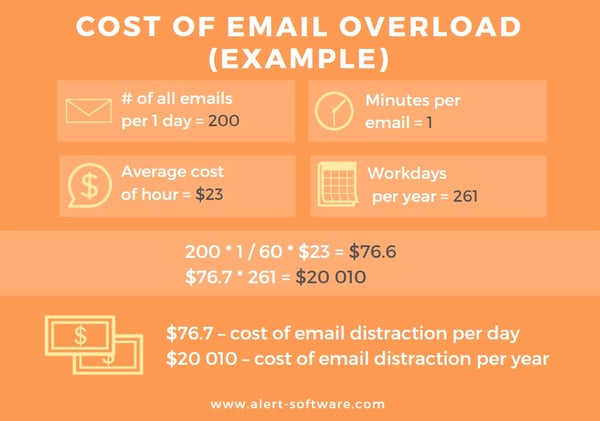
Add up the number of emails that are received across your organization every day. Factor in the most conservative estimate of 60 seconds lost to read each email, and multiply it by the average salary. This will give you a conservative idea of what the problem is actually costing you.
How to reduce these costs
- Choose other tools for delivering critical communication within your organization, such as screen savers, pop-up notifications, and desktop tickers.
- Aggregate many emails that are not time-sensitive into a single newsletter, reducing the overall number of emails sent.
- Encourage the use of project platforms and other collaboration tools, such as a staff communication app, where employees can choose to opt in to discussions and share ideas.
- Implement email rules and policies that prohibit all-staff emails, require strict parameters for CC and BCC use, and designate times and days when no emails can be sent.
- Aim to reduce the total number of internal emails by a set amount, such as 70 per cent. So, for example, if email overload is costing your organization $10,000 per year, you can save $7,000.
2. How much money are you losing to time-consuming meetings?
Meetings are an often unavoidable fact of life in the business world. Meetings are a divisive topic… people either love them or loathe them. Those who loathe them resent them for wasting time that could be spent doing other things.
A 2023–2024 analysis by the London School of Economics put the cost of unproductive meetings for US businesses at $259 billion per year.
How to estimate what unproductive meetings are costing you
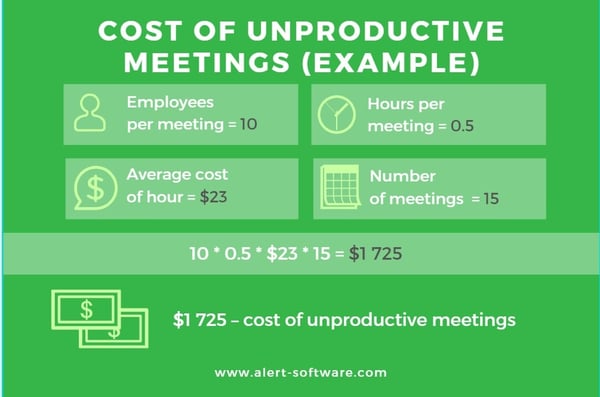
You can calculate this using the following meeting cost analysis formula: determine the average cost per working hour in your organization, multiply that by the average number of employees participating in meetings, and multiply by the number of meetings.
How to reduce these costs
- Make meetings less formal, for example, have short stand-up meetings.
- Structure meetings so that they are focused on problem-solving, have a clear context, and work to enhance relationships.
- Make your other communications channels more effective. Could the meeting have been an email or a face-to-face conversation instead?
- Send a survey if you need to consult multiple people – you can reach a consensus without all needing to be in the same room.

3. Staff turnover and absenteeism as a result of poor internal communications
Engaged employees feel positive about their workplaces, feel included and valued, and are more likely to be productive.
When employees are disengaged, they don’t focus on their work properly, they don’t care about business outcomes, they are more likely to be absent on any given day (or even present, but “checked out” mentally), and ultimately they start to look for a better place to work.
There are many contributing factors to successful employee engagement, and internal communication is one of them. When you want people to feel included, you need to tell them things and not expect them to operate in the dark.
While internal communication is just one factor in engagement, and improving employee engagement should be a holistic endeavor, there are still costs to be borne when you don’t get this right.
How to estimate what this is costing you
Unless employees are truthful in the exit interview process, you may not be able to tell how many left because of poor internal communications.
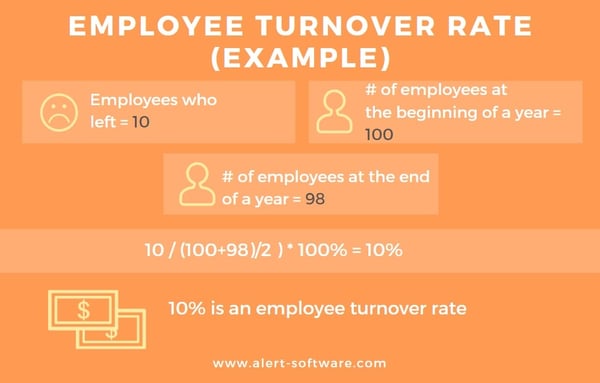
But if you have a high staff turnover rate, it is generally safe to assume there is a problem with the culture in your organization, which includes your internal communications. Calculate the total number of employees you have at the beginning of the year, then subtract the number that have left to get a percentage out of 100.
How many new hires have you needed to take on to replace the employees who have left? Add up the associated cost of replacing these employees. A lot of new hires fail within the first 90 days so you may need to go through the recruitment process multiple times because one employee has left.
Look at trends in your absenteeism rates. Is it increasing? How many hours are lost to absenteeism each year? What is that cost in salary?
How does your organization compare to the rest of your industry?
For example, according to the 2026 NSI National Health Care Retention & RN Staffing Report, the average hospital turnover rate was 18.3%, and the average cost to replace a single bedside registered nurse is now $56,300.
The Banking and Finance industry has a similarly high turnover rate – 18.6% – according to a Compdata survey. These two industries are higher than other sectors. Are you faring better or worse?
How to reduce these costs
- Put more focus on boosting employee engagement, improving your internal communications processes, and fostering a culture of good communication within your organization.
- Carry out a benchmarking survey to determine what the levels of engagement are in your company and follow up at regular intervals with the same questions so you can measure whether any engagement initiatives are having the desired effect.
4. Cost of reputational damage and bad customer service
Ineffective or non-existent communication within an organization can affect the organization’s reputation with external stakeholders, including customers, investors, and other partners.
For example, it can lead to miscommunication with customers about what they can expect. It can also affect outcomes such as successful project delivery.
A recent study by the Project Management Institute found ineffective communications had a negative impact on the successful execution of a project, and in one-third of the time, it was the primary factor in a project’s failure.
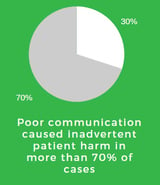 In some cases, communication can be a matter of life and death.The Joint Commission consistently identifies communication failures as among the most frequent causes of serious medical errors.
A review of Joint Commission sentinel event data found communication failures implicated in more than 70% of adverse events. The Joint Commission's August 2024 Journal on Quality and Patient Safety reinforces this, finding that an estimated 67% of communication errors occur specifically at handoff — when care responsibility transfers from one provider to another.
How to estimate what it is costing you
Did the project fail? What was the cost of the project?
Do you have errors that were made? What will it cost you to fix?
Have you had legal problems as a result of poor communication? What is the cost of the legal bills and anything you’ve had to pay to another party as a result of litigation?
Have you suffered reputational damage? Are your sales down? By how much?
How to reduce these costs
Implementing good communication practices, investing in internal communication tools in your organization, and ensuring they form part of any project planning will help keep them at the forefront of people's minds and hold people accountable.
5. Cost associated with ineffective emergency communications
Responding promptly in an emergency or crisis can affect your business in many ways. From ensuring the safety of your most important resource – your employees – to how well your business recovers in the aftermath of a disaster, communicating quickly and efficiently is key.
Having robust systems and processes in place to communicate in an emergency can help save lives, protect your company’s assets, and maintain your reputation afterward.
The quicker you respond during an emergency, the better the outcome for everyone… including your bottom line. For example, in a hospital, if there is a disaster, productivity doesn’t need to be sacrificed if you already have capacity management plans in place. Or in a sales environment where you have mitigation strategies for the telephone system being down.
How to estimate what it is costing you
Determine how much time has been lost to the crisis that has befallen your organization. Multiply that time by the cost of wages.
Add in any other losses – such as infrastructure, estimated loss of sales. What is covered by insurance? What isn’t?
You may also have legal costs and ongoing reputational damage.
How to reduce these costs
- Implement best-practice emergency management response protocols within your organization.
- Practice drills, evacuations, and other exercises and scenarios to ensure all employees understand what is required of them in an emergency.
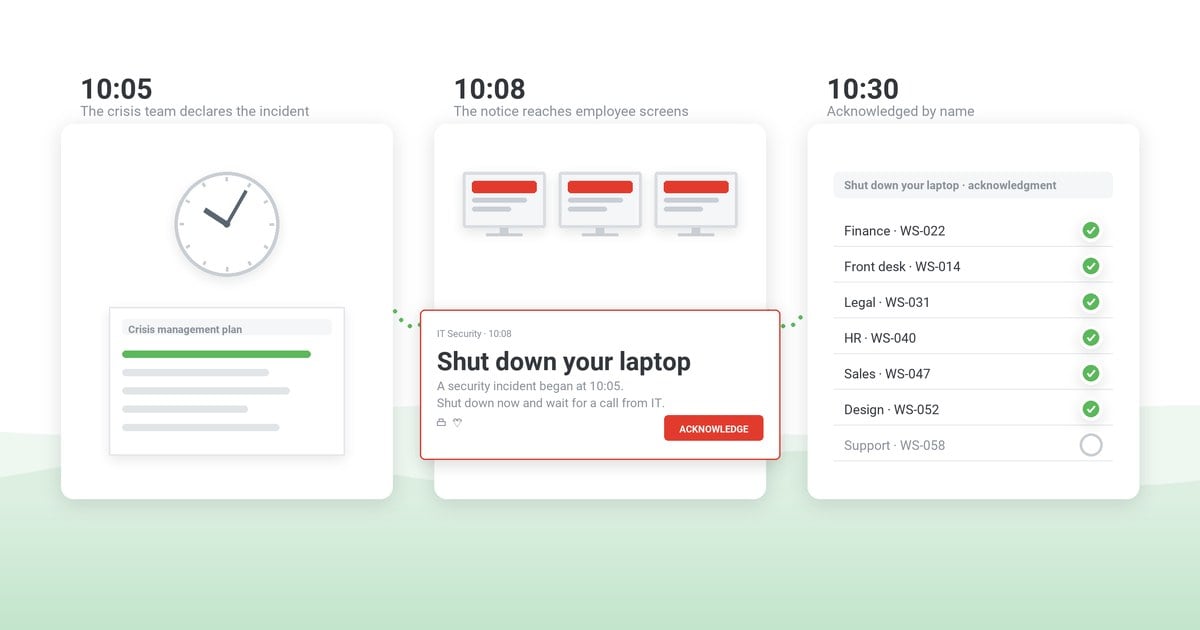
- Have a state-of-the-art notification system where you can send emergency alerts at the touch of a button to save as much time as possible in a disaster.
- Have a business continuity plan to ensure you can get up and running again quickly after an emergency.

How DeskAlerts can help
Fight internal communications failures and inefficiencies in your organization with the DeskAlerts platform – a multifunctional software system that helps you to overcome email overload and fatigue by sending pop-up notifications straight to employee desktops, reducing the number of messages in their inboxes.
DeskAlerts will help you to save money by making your internal communications processes more efficient.
Pop-ups can be sent for more urgent communications, but other features, such as a scrolling ticker-tape news feed and screensavers, can be used to deliver important information that isn’t so urgent.

 Caroline Duncan

 Steve Wilson: Oct 16, 2026, 9:00:00 AM