A change management communication plan is a schedule of the messages a change requires: for each audience, what they hear, from whom, through which channel and when. This guide gives you a plan template to copy, a stakeholder map, examples for each stage from the announcement to reinforcement, and the decisions behind a change communication strategy.
Table of contents
1. What goes into a change management communication plan
2. Change management communication plan template
3. How to build a change communication strategy in seven decisions
4. Change management communication examples
5. How to handle resistance and questions
6. How to confirm the change message was received and understood
7. Approve the plan with its review date
8. Frequently asked questions
What goes into a change management communication plan
For each audience, a change communication plan answers six questions. The table lists them, with a common mistake for each.
| Element | What it decides | Where it usually goes wrong |
|---|
| Audience | Which groups are affected, and how differently | "All employees" is treated as one audience, so the people whose daily work changes get the same message as everyone else |
|---|
| Key message | What each audience must understand and do | The message is written for the steering committee, in program language, and means little to the people who must act |
|---|
| Channel | How the message reaches the group, and whether it leaves a record | Everything goes by email, including the one notice that needs action by a date |
|---|
| Sender | Who the message comes from | The program team sends messages that only the sponsor or the line manager can credibly send |
|---|
| Timing and cadence | The order of disclosure and how often the program interrupts people | The order is improvised on the day, so someone who should have heard first hears it second-hand |
|---|
| Feedback and evidence | How questions come back, and how you will know the message landed | Progress is reported as messages sent and emails opened, while the help desk shows people cannot work |
|---|
Our article on why change management fails without communication covers what happens when one of these elements is missing.
Change management communication plan template
The sample plan in this section covers a records-system replacement, from four weeks before go-live to 30 days after. Copy the columns, replace the rows with your own audiences, and keep one row per audience and stage, because different audiences need different messages. For the technical side of a system change, see our guide to planning a software rollout.
| Stage | Audience | Key message | Channel | Timing | Owner |
|---|
| Prepare | Leaders and line managers | What is changing and why, what is still undecided, and the questions their teams are likely to ask | Briefing with talking points and a written FAQ | Four weeks before go-live, before any wider announcement | Sponsor and change lead |
|---|
| Prepare | Help desk | Known issues, answers to likely questions and the escalation path | Briefing and a knowledge base article | Before the all-employee announcement; a known-issues session one week before go-live | IT |
|---|
| Announce | Employees whose role changes | What changes for them personally, and what support they get | One-to-one conversation | Before the all-employee announcement | Line manager |
|---|
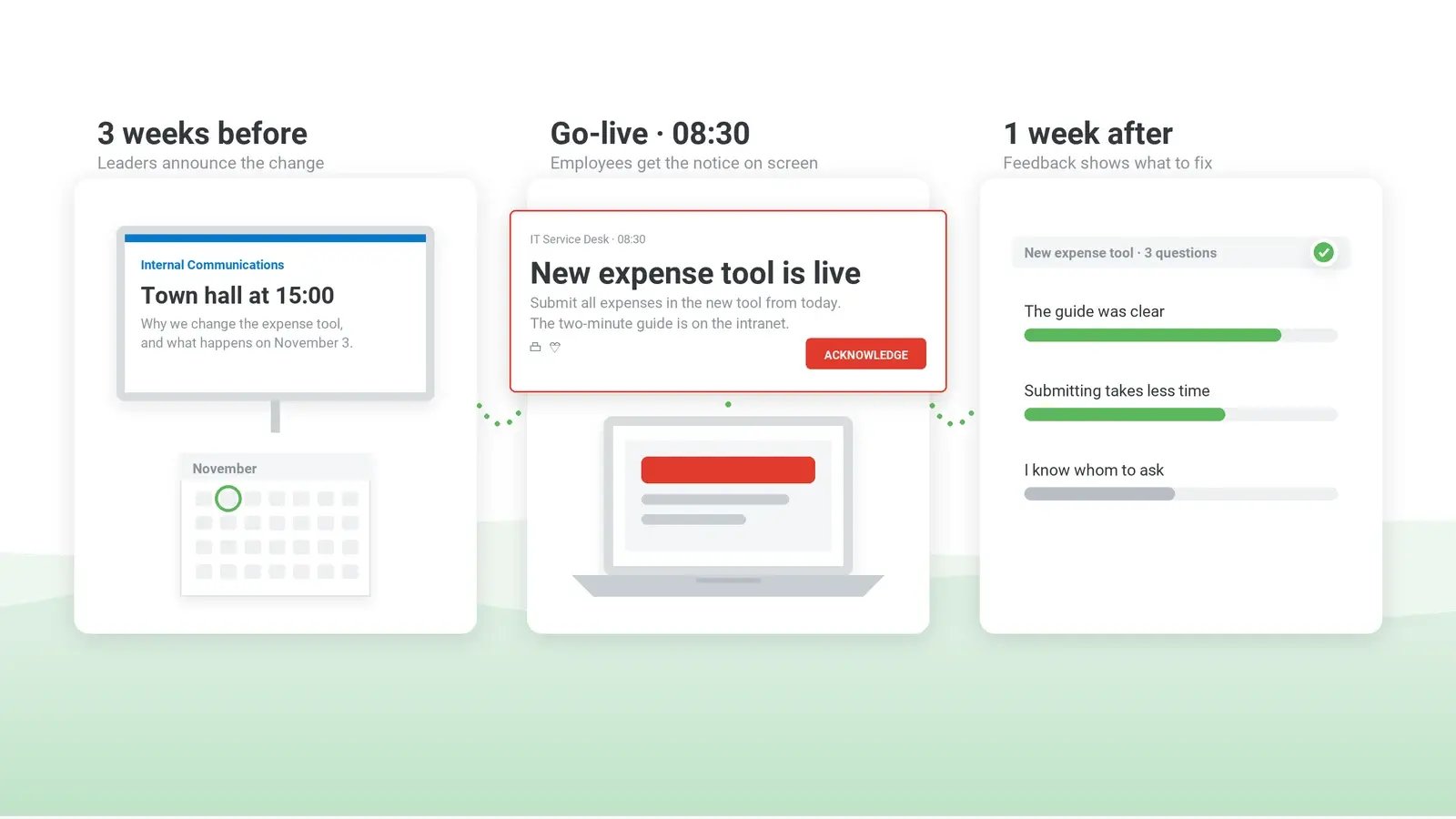
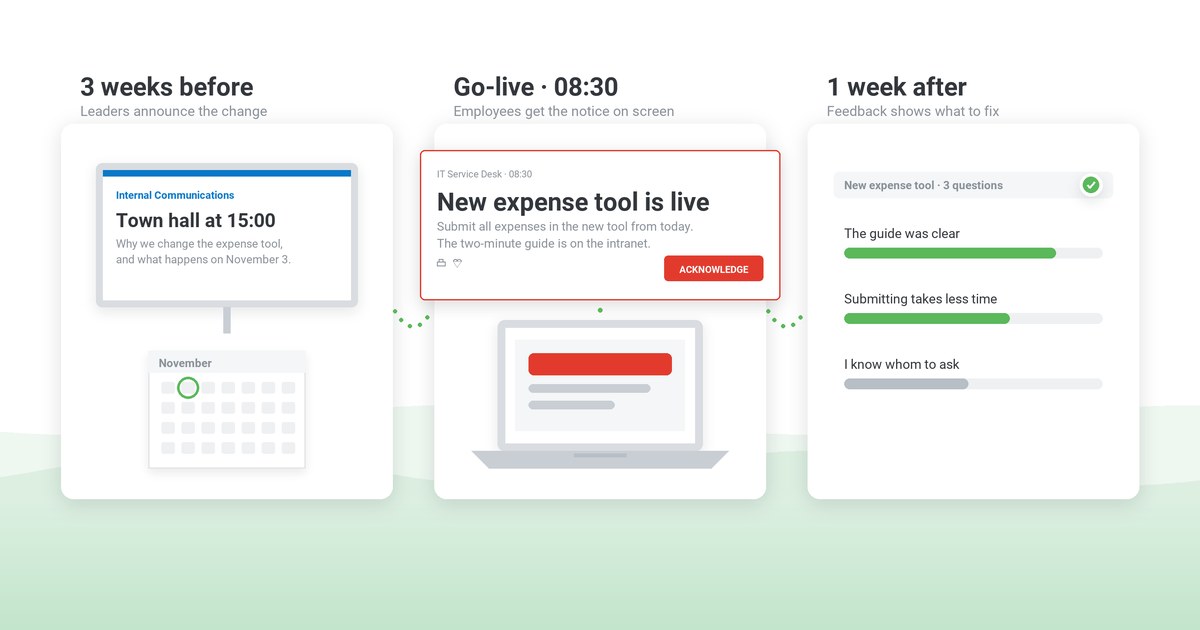
| Announce | All employees | What the change is, why it is happening, the go-live date and where to find help | Town hall or a short sponsor video, an email from the sponsor and the intranet change page | Three weeks before go-live | Sponsor and internal communications |
|---|
| Explain | Teams that use the system | What changes in their daily work, what stays the same, and who to ask | Team meeting led by the manager; FAQ on the change page | The week after the announcement | Line managers |
|---|
| Train | Employees who create records | The training module, its deadline and the paper fallback for the migration window | Training invitation; reminders only to those not yet trained | From three weeks to one week before go-live | Training lead |
|---|
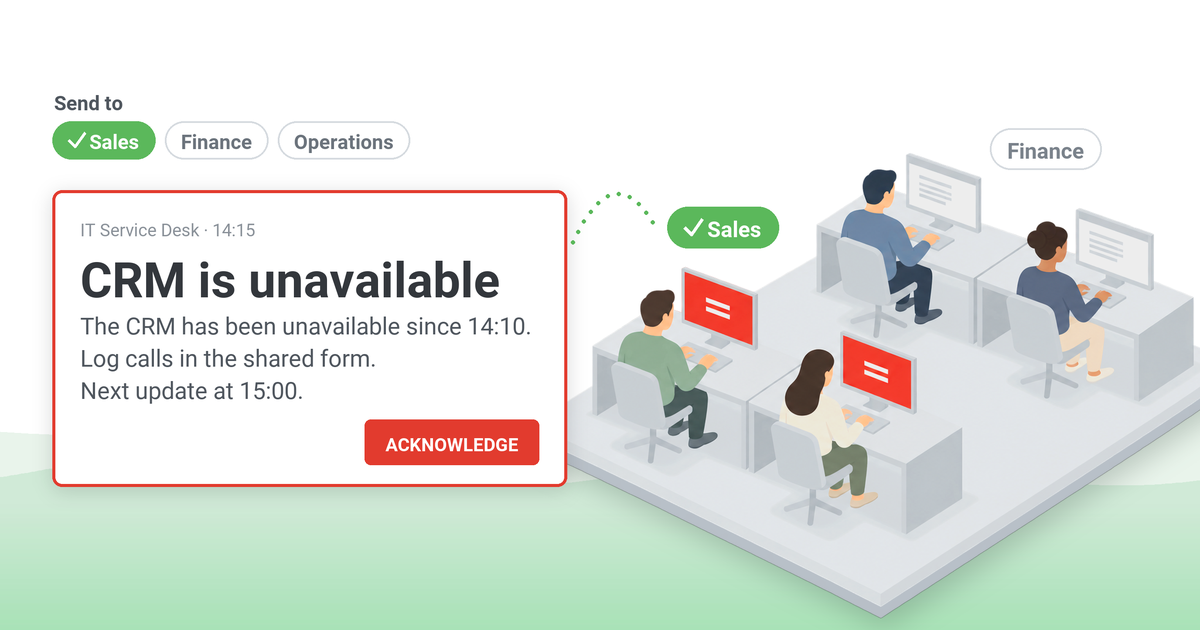
| Go-live | Employees who create records | What they cannot do during the migration window; from go-live, create records only in [new system] | Desktop alert to the affected groups | One week before the migration window, on the day, and on go-live day | IT and internal communications |
|---|
| Go-live | Everyone else | The new system is live and where to find help | Scrolling ticker, screensaver and digital signage; intranet news | Go-live day and the week after | Internal communications |
|---|
| Reinforce | All users of the system | What employees raised, what changed as a result, and what is still open | Short pulse survey, then a sponsor update | One week after go-live; update at 30 days | Change lead and sponsor |
|---|
Rows a larger rollout adds:
- employee representatives or the works council, at the design stage – months before go-live if a works agreement is needed;
- the steering committee's weekly readiness report against the objectives (Example 8);
- a policy that changes with the system, sent to the people it applies to with an acknowledgment deadline (Example 6);
- shift staff and contractors: the go-live message at the start of the shift through shift leads, the mobile app or SMS; contractors without a directory account through their own manager or the agency contact.
How to build a change communication strategy in seven decisions
The template is built from seven decisions. Make them roughly in this order, because the early ones shape the later ones.
1. Set objectives you can check by a date
An objective such as "a smooth transition to the new system" cannot be measured. Write each objective as what a group must know or do by a date, and how you will verify it:
- by go-live, the employees who create records have completed the training module and know the paper fallback for the migration window;
- before migration night, each team manager has confirmed that the team knows the cutoff time;
- by day five after go-live, "I cannot work" tickets are below [n] a day.
Agree in advance what happens if an objective is missed – for example, a team moves to a later wave or gets extra floor support on go-live day – so that you can act as soon as a readiness figure falls short. If IT already runs an IT communication plan, the go-live messages go through its channels rather than a parallel set.
2. Build the stakeholder map
A stakeholder map sorts people by what changes for them, not by the org chart. It decides the rows of the template and who must hear first.
| Group | What changes for them | What they need from the plan | Best sender | Risk if the row is missing |
|---|
| Executive team | Budget, priorities, their visible role | Dates for their appearances, the reason in their own words | Sponsor | Silence after the launch reads as a stalled program |
|---|
| Line managers | Their team's work, sometimes their own role or headcount | The news before their teams, an FAQ, an escalation route | Sponsor or program lead | They hear the news with their teams, and the first team conversation is speculation |
|---|
| Directly affected employees | Daily tasks, tools, location or terms | What to do, by when, and what support they get | Line manager | They hear it from colleagues or the help desk |
|---|
| Everyone else | Little or nothing | That the change is happening and where to find help | Internal communications | They hear about it from affected colleagues and assume it applies to them |
|---|
| Employee representatives | Their consultation rights | The proposal in time to influence it | HR | The timeline can be challenged and reset |
|---|
| Shift, frontline and contract staff | The same as the affected group, without a desk or a directory account | A route that reaches them on shift | Shift lead, agency contact | They find out on go-live day |
|---|
3. Decide who hears first, and plan for a leak
The order of disclosure is hard to correct once the news is out, so decide it early. A common order is the sponsor and leadership team, employee representatives where consultation applies, line managers (those whose own roles change are told individually first), the people directly affected, then everyone else. Staff should not first hear about a change from customers or the press, so external announcements go out with the internal one or after it. In a listed company, market-disclosure rules may set the timing, so legal decides the order.
When a change touches jobs, the law can set the order and the minimum notice. In Great Britain, an employer proposing 20 or more redundancies at one establishment within 90 days must begin consulting employee representatives at least 30 days before the first dismissal takes effect, or 45 days where 100 or more are proposed (Trade Union and Labour Relations (Consolidation) Act 1992, section 188). In the US, the WARN Act requires covered employers to give 60 days' written notice of a plant closing or mass layoff to employee representatives or, where there are none, to each affected employee, and to state and local government (29 U.S.C. 2102). Other countries have their own rules, and works agreements can add to them. HR or employment counsel confirms what applies before a date goes into the plan.
Before the first briefing on anything sensitive, draft a holding statement of two or three sentences: what is being considered, when staff will hear more and from whom. If the news leaks, the statement can go out the same day instead of waiting for a full announcement.
4. Write key messages that survive being forwarded
A key message will be forwarded, screenshotted and summarized by people who were not in the room, so it has to make sense on its own. For each audience it states what changes, for whom, from when, what the reader must do and by when, what stays the same, and what has not been decided yet. Naming what is undecided, with the date it will be settled, makes the rest of the message easier to believe.
Two things take longer than teams expect: review by HR and legal of anything touching roles, terms, pay or monitoring, and translation into every language your employees work in. Both belong in the schedule. Our guide to communicating change to employees goes further into the wording of individual messages.
5. Match each channel to the job of the message
Choose the channel by what the message has to do.
| Job of the message | Channels that suit it | What the channel must be able to do |
|---|
| Explain and persuade | The sponsor at a town hall or in a short video; team meetings | Carry the sponsor's own words to the teams the sponsor cannot meet |
|---|
| Serve as the reference | An intranet change page with the FAQ, dates and training links | Hold one current version that every other message links to |
|---|
| Require action by a date | A message that interrupts work, sent to the affected group | Reach only the people who must act, including computers that were off at the time of sending |
|---|
| Create a record | A message each person confirms | Take a deliberate confirmation, list by name who has not confirmed, follow up with them only |
|---|
| Keep the change visible | Digital signage, screensavers, a ticker | Show the date and help link on idle or shared screens without another email |
|---|
6. Make the sponsor and line managers the senders
Prosci's summary of its Best Practices in Change Management research (updated August 7, 2026) reports that 58% of employees prefer to hear about the personal impact of a change from their supervisor, while most want the business reasons from the CEO. The same research found that projects with extremely effective sponsors were 79% likely to meet their objectives, against 27% for those with extremely ineffective sponsors.
A sponsor will usually agree to a calendar at kickoff; holding them to it is harder. Put four dates on the steering committee's first agenda: the launch, a message a week before go-live, an appearance on go-live day and the 30-day update. A missed appearance then shows up in the status report like any other slipped milestone. Name a stand-in from the leadership team for dates the sponsor cannot make.
Line managers pass many change messages on to their teams, and a message can change along the way. Each manager confirms the team conversation by a date, and you follow up on the gaps, as closely as you track training completion. Prosci points out that people managers often deliver the message without checking what their teams actually heard. A week after the announcement, ask a sample of managers which questions came up; the answers show what the cascade actually delivered. For a system change, give managers access to the new system before their teams, so they can answer questions from their own experience.
7. Set a communication cadence employees can absorb
Start from the organization's change calendar – every program that will reach the same teams this quarter, with its launch, go-live and survey dates – and build one if none exists; the calendar of your internal communications strategy is the natural place for it. If a performance review cycle, a security policy refresh and your go-live fall within two weeks of each other, negotiate the dates or combine the messages. Mark the periods when no go-live is allowed, such as an IT change freeze, and those when announcements land badly, such as year-end close or peak season.
Change fatigue also comes from how often a program interrupts people. Decide at the start which messages may interrupt work. In the records-system case, three qualify: the migration-window notice, the go-live alert to the people who create records and, if the change brings a new policy, the acknowledgment request. Progress news and training tips run on the change page, on idle screens and in managers' regular team meetings. Employees then know that a program message that interrupts their work needs action.
Change management communication examples
The examples follow the stages of the template; Examples 6–8 cover a policy change, a restructuring and the steering committee's view. Replace the bracketed text.
Example 1 – Announce: the sponsor's email to all employees
Subject: We are moving to a new records system on [date]
From [date], we will create and store client records in [new system] instead of [old system]. We are making the change because [one-sentence reason]. Existing records will be moved to [new system] before go-live. If you create or update client records, please complete the 30-minute training module by [date] – you will find the link on the intranet change page. Still to be decided: [open point]; we will confirm it on the change page by [date]. If you have questions, ask your manager or post them on the change page.
[Sponsor's name and title]
Example 2 – Explain: talking points for the manager's team meeting
- What changes for us: from [date], [team task] moves to [new system]. [Task that stays the same] does not change.
- What you need to do: complete the training by [date]; I will book [time] for us to do it together if that helps.
- During the migration window ([dates]), we use the paper form; I will bring copies.
- Not decided yet: [open point]. I will tell you as soon as I know, and no later than [date].
- Questions I cannot answer today go to the change team, and the answers go on the change page.
Example 3 – Train: a reminder to employees not yet trained
Subject: [n] days left to complete the [new system] training
Our records show you have not yet completed the [new system] training. It takes about 30 minutes: [link]. From [go-live date], new records can be created only in [new system]. If you cannot complete it by [date], tell your manager so that we can arrange a session on the floor.
Example 4 – Go-live: the migration-window notice and the go-live alert
Records migration tonight: from 6 p.m. on [date] until 8 a.m. on [date], you will not be able to save new records in [old system]. Note any new records on the paper form and enter them in [new system] the next morning. Help desk: [extension].
[New system] is live. From today, create all new records in [new system]. Quick guide: [link]. Floor support today: [location, hours].
Example 5 – Reinforce: the 30-day update from the sponsor
Subject: [New system], one month on – what you told us and what we changed
Thank you for the [n] responses to last month's survey and for the questions you raised with your managers. Three things came up most: [issue 1], [issue 2], [issue 3]. As a result, we have [change 1] and [change 2]. [Issue 3] is still open; we will update you by [date]. The paper form is now withdrawn; if anything still stops you from working in [new system], contact [support route].
[Sponsor's name and title]
Example 6 – A policy change sent as an alert that requires acknowledgment
Title: [Policy name] v[n], effective [date] – acknowledge by [date]
Our records-handling policy changes on [date], when [new system] goes live. The main change: [one sentence]. Please read [policy name, version] [link] and click Acknowledge by [date] to confirm. Questions: [policy owner, contact].
Putting the version in the title keeps acknowledgments of a later reissue separate from those of the original.
Example 7 – A restructuring announced as a proposal under consultation
Subject: Proposal to consolidate [function] at [site] – consultation begins [date]
We are proposing to [one sentence]. No decision has been made. From [date], we will consult [the works council / employee representatives] on the proposal, including ways to avoid or reduce its impact. If your role could be affected, your manager will speak with you individually by [date]. We will post an update on the change page after each consultation meeting.
[Sponsor's name and title]
Where collective consultation applies, the date for individual conversations follows the consultation timetable.
Example 8 – The steering committee's weekly readiness update
Records system – readiness, week of [date] (go-live in [n] days)
Training: [n] of [n] records staff completed (objective: all by [date]); lowest team: [team], [n]%.
Quiz: [n]% answered the paper-fallback question correctly.
Policy acknowledgment: [n] of [n]; [n] outstanding, managers following up by [date].
Shift staff: [n] of [n] confirmed through shift leads.
Manager cascade: [n] of [n] team conversations confirmed.
Help desk: change-related tickets [n] last week, [n] this week.
Sponsor: go-live message drafted; appearance confirmed for [date].
Decision needed by [date]: [team] is at [n]% training completion – move it to the second wave or add floor support on go-live day.
How to handle resistance and questions
Resistance often has a practical cause, such as missing information, a real loss, competing deadlines or not being consulted. The table lists common objections, the likely cause and what helps.
| What you hear | What usually lies behind it | What helps |
|---|
| "Why are we doing this at all?" | The reason was given as a gain for the organization, not for the people asked to change | Alongside the business reason, say what improves for this team and what it costs them |
|---|
| "The old system worked fine." | People lose their expertise for a while, and with it some standing | Early hands-on access, champions in each team, and an honest admission that the first weeks will be slower |
|---|
| "This is the first step toward job cuts." | People fill silence with the worst case, especially after earlier restructurings | Say plainly what is and is not in scope; never deny something that has not been decided |
|---|
| "I have no time for training." | Several programs compete for the same weeks | Agree protected time with managers; move dates using the change calendar |
|---|
| "Nobody asked us." | Feedback was invited without saying what it could change | State what feedback can change (timing, training, support) and what it cannot (the decision itself) |
|---|
Expect resistance from the middle as well as the front line. In Prosci's research, 43% of participants named mid-level managers as the group most resistant to change, and managers often face losses of their own – headcount, targets, reporting lines. Give them a route to raise their own concerns before they are asked to answer their teams'.
Questions need an owner and a turnaround. Collect them from managers, the help desk and the change page; answer within a set number of days; publish the answers in one FAQ; and tell the person who asked.
How to confirm the change message was received and understood
At the 30-day review, the sponsor will want to know three things. Did the people affected understand what to do, did they do it, and, for a policy change, is there a record of who confirmed it? Three kinds of change management metrics answer them:
- Understanding – a three-question quiz at the end of training, with results by question and by team.
- Behavior – training completion by team, use of the new system against the old one, "I cannot work" tickets, and the workarounds that appear in the first weeks.
- Record – for the policy, acknowledgments by team on the effective date and the names managers are still following up.
Most rows of the template run on channels you already have, such as email, the intranet and team meetings. Three rows need more than email usually provides: a go-live notice that reaches only the affected groups and is hard to miss, a confirmation from each person for the policy, and a short survey after go-live. These are the rows where employee notification software helps most. DeskAlerts, our own product, handles them as follows.
- Targeted notices. The go-live notice goes only to the affected groups or organizational units, synchronized from Active Directory or Microsoft Entra ID, and is scheduled in advance for the date in the plan. The Keep Active setting keeps attempting delivery to computers that were offline at the time of sending, so a notice set to cover the next shift can reach people who switch on their computers later.
- Acknowledgment. With acknowledgment on, the alert's close button is disabled, and the employee can close it only by clicking Acknowledge; an optional Postpone button lets an employee who cannot stop work at that moment, such as a clinician at a workstation, acknowledge later. The Users Report shows, person by person, who received and who acknowledged, and a resend can go only to those who have not acknowledged – the detail behind confirming who acknowledged a critical message.
- Feedback and understanding. Quiz and survey results for the sponsor's 30-day review can come from DeskAlerts. Surveys, polls and quizzes go out as alerts; a quiz has defined correct answers, publishers see the responses in the console, and results export to CSV or Excel. The same employee survey tool carries the pulse survey a week after go-live.
- Reinforcement. To keep the change visible on idle screens, a scrolling ticker runs on Windows and macOS, and screensavers and lock screens on Windows.
On the mobile app, receipt is reported when the employee opens the alert, and the alert does not pop up over the screen as it does on a computer. SMS requires a third-party gateway that your organization connects. For shift staff without a computer, confirmation can come through the shift lead or through an RSVP alert, a two-option reply that can go out through the mobile app, SMS, email or Microsoft Teams.
A per-person report may need agreement before it is switched on. In Germany, a works council has co-determination rights over technical devices designed to monitor employees' behavior or performance (Works Constitution Act, section 87(1) no. 6); ask employment counsel whether an acknowledgment report falls under it. Elsewhere, expect the data protection officer to ask what the report is for (a record that the policy was received, not a performance measure), and who can open it. For a wider comparison of options, see our page on change management communication tools.
Approve the plan with its review date
A plan is approved when the sponsor signs off the objectives, the order of disclosure and the dates – and the 30-day review is booked in the same meeting. Bring three things to that review: the objectives from decision 1, the evidence from section 6, and what the feedback changed. Agree with compliance where the acknowledgment export is kept and for how long, because the request for it often arrives after the program team has disbanded. Close the plan when the objectives are met, not when the last scheduled message has gone out.
See a go-live notice and a policy acknowledgment in practice
A demo shows an alert sent only to the groups a change affects, a policy acknowledgment with the deadline in its text, and the report of who received and who acknowledged.
Frequently asked questions
What is the difference between a change communication strategy and a change communication plan?
A change communication strategy is the set of decisions the steering committee approves once: the objectives, the audiences, the order of disclosure, who speaks and which messages may interrupt work. The change communication plan is the dated schedule built from those decisions, and it moves: re-dated at each rollout wave and adjusted within the agreed scope for feedback. If the plan keeps changing in ways the strategy does not explain, the decision itself is being reopened, and that goes back to the sponsor.
What is the difference between change management and change communication?
Change management covers everything people need to adopt a change: sponsorship, training, support, reinforcement and the measurement of adoption. Change communication is one of its workstreams. Communication can build awareness and understanding, but it cannot make up for missing training, a system that does not work or a manager who cannot answer questions.
Does every change need its own communication plan?
A program that changes how a group works – a new system, a restructuring, a relocation – needs its own change communication plan with a sponsor and a review date. A single policy update or a minor process change needs a row in the regular internal communications calendar instead, with the same care over who must act and by when.
What are the requirements for an internal communications and change manager?
An internal communications and change manager needs the standing to coach a sponsor and push back on dates, the judgment to sequence sensitive news, and enough grounding in employee relations to recognize when HR, legal or employee representatives must see the wording. Experience reporting adoption to program leadership matters more than channel skills, which are easier to learn.

 Steve Wilson: Nov 17, 2026, 8:00:00 AM