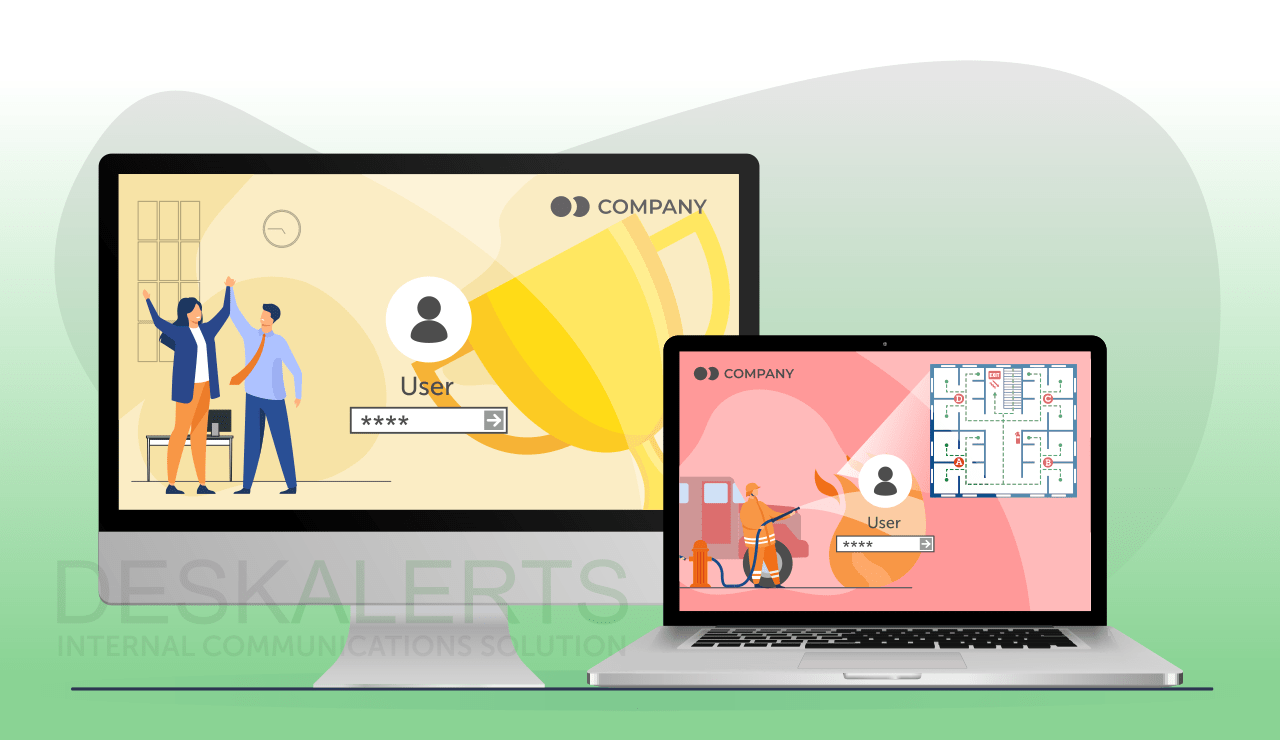
 Finding new and innovative ways to communicate with employees is becoming increasingly necessary in the modern corporate world. One way to do this is to use corporate desktop wallpaper on employee computer screens as a communication channel to relay important information that the company wishes to convey to its staff.
The company can manage and customize its employees' desktop background according to what they want them to view – sending key information and significant news to the employees’ desktops.
Table of contents
Why wallpaper is beneficial for internal communications
How is wallpaper usually used?
What can you publish on corporate wallpaper?
How to design your corporate wallpaper
Tips for making the most of corporate wallpaper
How to use DeskAlerts to manage corporate communication wallpapers
Why wallpaper is beneficial for internal communications
Corporate wallpaper is a good tool to use as part of your internal communications and marketing campaigns. Because it appears in a location that employees are going to look at every time they use their computers, you get the benefit of knowing that the information will be seen by your employees or customers.
Specific benefits when you communicate with wallpaper include:
- Reinforces the messaging that you send via other internal communications channels
- Helps reinforce your corporate brand
- Because of the nature of repetition, it helps with message recall
- Can be used in a creative, visual way to capture attention.
How is wallpaper usually used?
Many organizations will either use the default wallpaper that comes with Windows or deploy their own – often just with a logo or other corporate imagery. This can be a missed opportunity to use this space as part of internal communications and marketing initiatives: the desktop background is something that employees look at every day and is, therefore, a premium location for putting important corporate information that you want them to be aware of.
If you want to know more about this type of managing wallpapers, read the article about corporate wallpaper group policy.
What can you publish on corporate wallpaper?
You can publish just about anything you like on your company’s corporate communications wallpaper – this includes text and graphics. Good ways to make use of corporate wallpaper include:
- Ensuring a consistent corporate branding across the organization’s computers
- Publishing hints and tips and reminders – for example, password security, helpdesk numbers and other IT information
- Remind people about upcoming deadlines, events or training
- Remind people about policies and procedures
- Include mentions of good news
- Include interesting facts or statistics about your company
- Information about work wellness campaigns
- Dashboards and company or work team progress toward goals
- Breaking news
- Product updates
- Use emergency communications wallpaper to supplement your other emergency notifications
- Notices about planned IT outages and upgrades.
>> Find more ideas on how to use a corporate desktop background in this article <<
How to design your corporate wallpaper
When you decide to use corporate wallpaper as an internal communications channel, you’ll need to put some thought into how you design it. You’ll need to pay attention to the following in your company desktop wallpaper design:
- Design with the size of peoples’ monitors in mind
- Ensure your content is relevant and engaging
- Ensure your content is factual
- Ensure your content adds value to the recipient’s work and/or your organizational goals
- Ensure content conforms to branding guidelines
- Don’t crowd too much text onto the screen or other visual elements
- Content should be visually appealing
- Content should be placed in a way that won’t be obscured by icons
- Ensure that the resolution is high enough
- Ensure the aspect ratio is correct for the majority of monitors in your organization.
>> Read this article to learn the basics of creating corporate wallpaper <<
Tips for making the most of corporate wallpaper
If you’re going to use corporate wallpaper as a communications tool, you should make the most of it: don’t just set it once and forget about it.
- Change your wallpaper often. Perhaps every two weeks or another set interval.
- Have your wallpaper match other corporate campaigns that are running at the time.
- Use wallpaper communication in innovative ways to build excitement, such as counting down each day to a launch or a special event.
- Send different wallpapers to different groups of staff based on their roles, priorities, geographic location etc.
How to use DeskAlerts to manage corporate communication wallpapers
DeskAlerts is an internal communications software system that features a range of tools and communication channels to enhance communication and improve corporate culture in organizations.
One of DeskAlerts’ channels is one that enables you to set custom wallpapers on employees’ desktop computers. The information you send via corporate wallpaper cannot be missed by employees. You have complete control over their desktop backgrounds – new information can be deployed instantly and automatically appear on their backgrounds.
The program is easy to deploy and manage. The internal communications team or marketing team can easily learn and take charge of corporate communication through the desktop wallpaper. Remote employees can be easily reached with this messaging tool. It can send wallpaper image to a custom group of employees, to a specific individual, or to all of them.
Management can set a schedule when the customized background expires and when it will display new content. The desktop wallpaper can also revert back to its original display once the new display expires.
Desktop mass communication wallpaper can be sent in a wide range of image formats such as JPG, GIF, PNG or BMP image files. Even URLs can be used.
***
Corporate wallpapers are a great addition to your arsenal of internal communications tools to ensure that important information in your organization is shared appropriately with your employees. If you’d like to see how DeskAlerts can help you to deliver business communication wallpapers, get in touch with our team of experts for a free demonstration today.
Frequently asked questions
What makes effective communication?
Effective communication occurs when an organization takes a concerted effort to remove any barriers to communication and at the same time takes steps to introduce procedures that enhance and promote communication to ensure that all employees are well-informed.
How do you manage corporate desktop wallpapers?
There are two ways to manage corporate desktop wallpapers. The first is to use Group Policy in the Windows administrator settings – this will require the IT team to deploy new desktops to people. The second way is to use a system such as DeskAlerts for desktop wallpaper communication to bypass the need to involve the IT team so that new corporate wallpapers can be sent out by the internal communications or human resources teams.


 Steve Wilson: Oct 16, 2026, 9:00:00 AM